
Drag & drop your thumbnail here
JPG · PNG · WEBP · Recommended 1280×720 · Max 2MB
Original
YouTube Search (~168×94)
Mobile Feed (~120×68)
Dominant Colors
RGB Histogram
Grayscale Preview
Checks readability without color cues.
Title-Safe Zone
Keep key text inside the guide — edges can get cropped in some layouts.
Composition Grid
Rule-of-thirds guide for placing your subject/text.
Color-Blind Preview
Simulates protanopia (red-green color blindness).
Recommendations
Best-Practice Checklist
Official YouTube Thumbnail Guidelines
- Resolution: 1280×720 minimum (YouTube now recommends up to 3840×2160 for best quality); minimum width 640px.
- Aspect ratio: 16:9, matching the video player.
- File size: under 2MB (mobile upload limit).
- Formats: JPG, GIF, or PNG.
- Account requirement: custom thumbnails require a verified YouTube account.
- Design for small sizes: thumbnails can display as small as ~120×68px in feeds — keep text and subjects readable at that size.
- Avoid the bottom-right corner: YouTube overlays the video duration there.
- Accuracy: thumbnails must represent your video content and follow Community Guidelines — misleading thumbnails can be removed.
- Consistency: a recognizable style across your channel helps build viewer trust and recall.
YouTube Thumbnail Analyzer
The YouTube video thumbnail decides whether to get watched or skipped; your video thumbnail is competing with dozens of other creators from search, sidebar, feeds, and mobile views.
This YouTube Thumbnail Analyzer displays how well you designed your video thumbnail, uploads an image, and gets an analysis report within seconds. It scores from 0 to 100 and displays what to fix. The tool is completely free, with no account and no server storage.
Table of Contents
Why thumbnails fail at small sizes
Most creators thought to create a thumbnail for the full desktop monitor to grab the viewer’s attention, but actually the thing does not work like that. YouTube renders the thumbnail in multiple variations, roughly 168×94 pixels, in the mobile feed around 120×68. When the creator uses dark color, then it becomes invisible in dark mode.
A red-on-green contrast that looks bold to you is nearly invisible to viewers with red-green color vision deficiency—around 50% of men. None of these are creative failures. They’re technical ones, and they’re all measurable before you hit publish.
What the analyzer checks
The tool has various parameters that check and analyze the thumbnail on every upload. Each image has its own score from 0 to 100 with an easy explanation of what is good or what to fix.
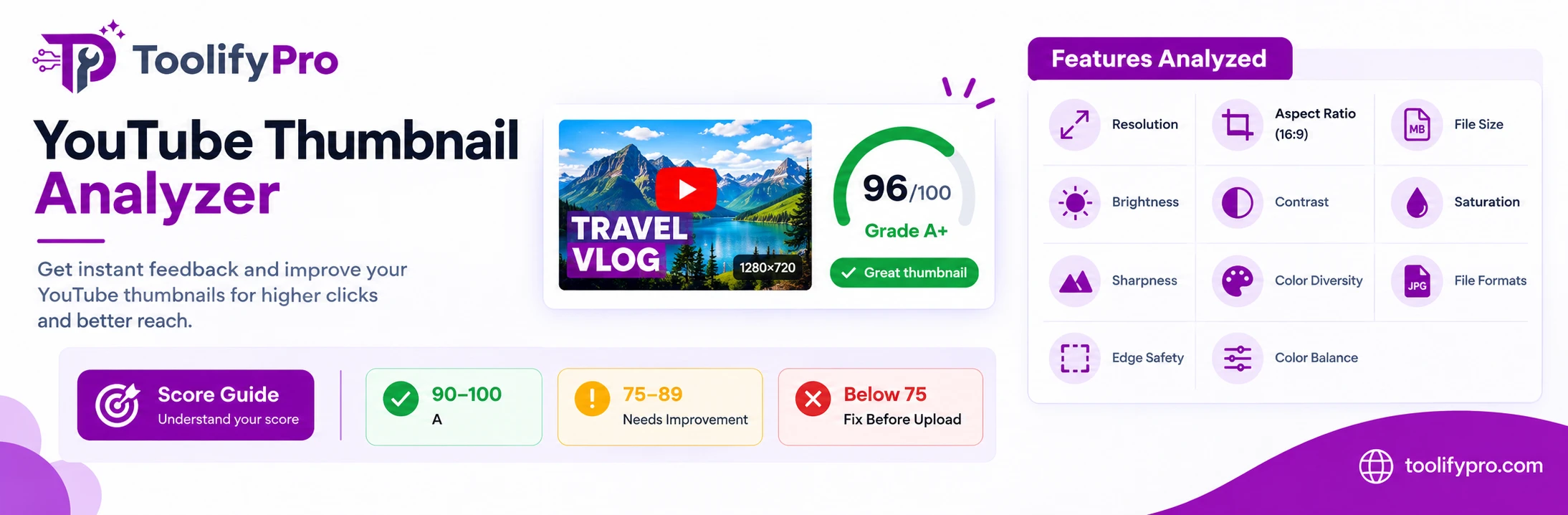
Resolution—The YouTube thumbnail recommended resolution is 1280X720 pixels; if the tool found a smaller or unmatched thumbnail, then the tool flagged that thumbnail.
Aspect ratio—Verifies true 16:9. Anything off-ratio gets letterboxed or auto-cropped by the player, often removing exactly the part you cared about.
File size—Checks against YouTube’s 2 MB upload limit, the most common reason a thumbnail upload silently fails on mobile.
Brightness measures mean luminance across the frame. Too dark and the image sinks into a dark-mode interface; too bright and it washes out against a white one.
Contrast—Evaluates tonal separation between light and dark regions. Weak contrast is the single biggest cause of unreadable thumbnails at feed size.
Saturation—Catches both extremes: flat, lifeless color that fades into the page, and oversaturated color that reads as low-quality or clickbait.
Sharpness—Runs edge detection to find soft focus, upscaling artifacts, and compression blur that only become obvious after YouTube re-encodes the file.
Color diversity—Scores the range of distinct colors present. A varied palette helps your thumbnail separate from the ones stacked above and below it.
File formats—YouTube supports JPG, PNG, or GIF, where JPEG compresses images and PNG preserves graphics and text.
Edge safety—This feature detects content is properly aligned and not going out of the borders.
Color balance—Checks whether the color combination is good or looks branded.
Visual diagnostics, not just numbers
The score generated by the YouTube thumbnail analysis tells everything: if it is above 90, things are going well, but if it is lower, the creator must work on the thumbnail and fix it before something goes wrong.
Search and mobile previews—Rectify the thumbnails to the actual sizes on the devices that viewers see your videos on; thumbnail size analysis is the first priority. If this is not fixed, correcting other things is not relevant.
Dominant colors—Checking the video thumbnail color consistency across uploads helps to build brand value.
The RGB histogram helps—you spot clipped highlights, crushed shadows, and color casts at a glance.
Grayscale preview—if the subject is still visible and the text is readable, it means the thumbnail has good contrast instead of relying on color alone.
Title-safe zone—Sometimes thumbnail content goes outside the border, especially the title text, which can look different from the YouTube layout.
The composition grid—it is important to follow the rule of thirds if you’re placing the subject and headline deliberately.
The color-blind preview—This is an analysis of whether the thumbnail will work for color-blind viewers.
Understanding your thumbnail score
For better understanding, we have grouped the score to measure how good your thumbnail is.
90–100 (A range)—If your thumbnail score is between 90 and 100, that means it passes the core technical benchmarks; the rest are just improvements in concepts, expression, or hierarchy of the topic.
75–89—There are one or two things that need to be fixed, which may include brightness, color balance, saturation, etc.
Below 75—The thumbnail is structurally wrong, typically due to thumbnail resolution or contrast; these must be fixed before upload.
Whenever you are analyzing the thumbnail, there is a report that lists prioritized recommendations and best practices, which shows the benchmarks that are passed. If you want to share the report with others, you can download the report and share it with the editor, client, or yourself.
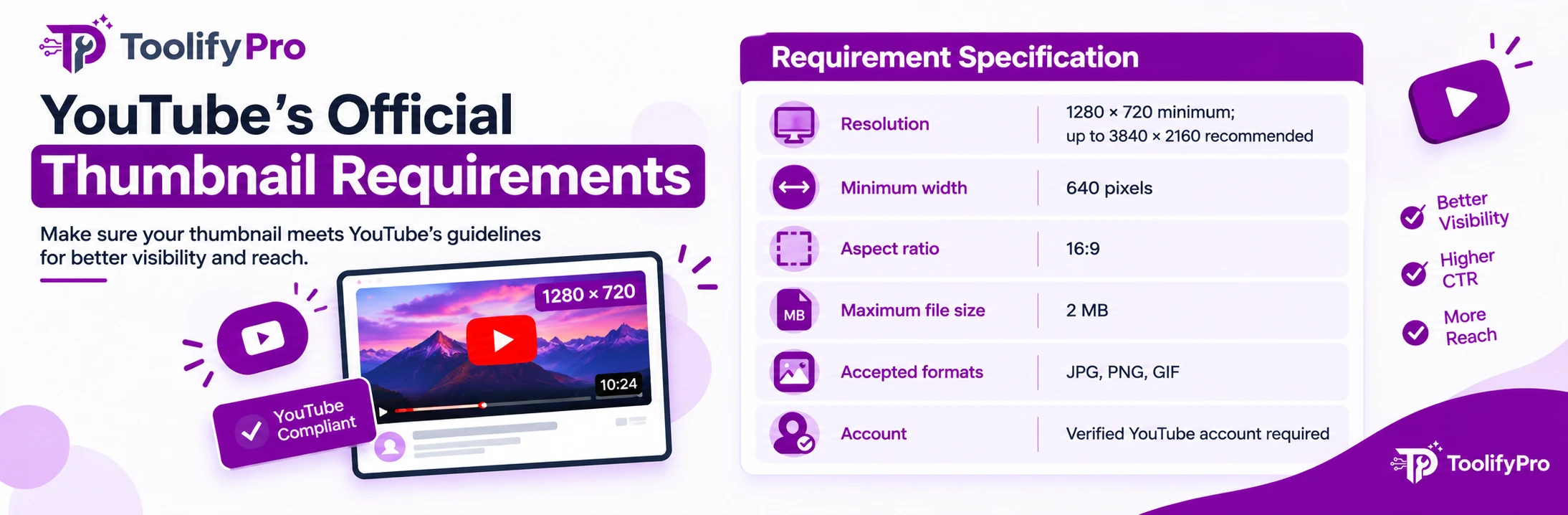
YouTube’s official thumbnail requirements
| Requirement | Specification |
|---|---|
| Resolution | 1280 × 720 minimum; up to 3840 × 2160 recommended |
| Minimum width | 640 pixels |
| Aspect ratio | 16:9 |
| Maximum file size | 2 MB |
| Accepted formats | JPG, PNG, GIF |
| Account | Verified YouTube account required |
There are more specifications, and the bottom-right corner should be clear because it may cover the YouTube video duration, and the thumbnail must not be misleading or violate the Community Guidelines.
How to use it
Using the YouTube Thumbnail Analyzer is as simple as 1-2-3. Simply follow the steps below and see the results to fix errors.
- Open the tool.
- Upload the thumbnail.
- See the results.
- Download the report.
Frequently asked questions
Is the YouTube Thumbnail Analyzer free?
Yes. No account, no upload cap, and free downloaded reports.
Are thumbnails stored?
No, all processes are done within the browser. As soon as you refresh the page, the thumbnail gets discarded.
Does a high score guarantee more views?
No. The tool only analyzes the technical parameters and quality of the thumbnail, which may include resolution, color, text, and crop safety. On the other hand, more views depend on what people are looking for and the context of the videos. Yes, you can say that good thumbnails may increase the impressions of videos.
Which format should I use?
You can use different image formats, such as JPEG, JPG, PNG, and non-animated GIF
What is the best YouTube thumbnail size?
1280×720 pixels, 16:9 aspect ratio, under 2 MB. This is YouTube’s official recommendation and what the analyzer checks first.
Does thumbnail size affect click-through rate (CTR)?
Indirectly. A wrong aspect ratio gets cropped by the player, and low resolution reads as blurry at feed size — both hurt CTR. But CTR is driven mostly by the concept and title pairing, not technical specs alone.
What’s a good CTR for a YouTube thumbnail?
Typically 2–10% depending on niche and traffic source, per YouTube Creator Academy guidance. This tool doesn’t measure CTR directly—it checks the technical factors (legibility, contrast, crop safety) that make a thumbnail capable of earning clicks.