
🎬 YouTube SEO Checker
Why are your YouTube videos not getting views? Identify the issues and fix the titles, descriptions, tags, captions, and engagement signals.
Table of Contents
What Is a YouTube SEO Checker?
A YouTube SEO checker is an online tool that discovers issues in YouTube videos and suggests fixes that are against best SEO practices and the algorithm. Enter the video URL and press the analysis button. The tool will start analyzing the factors that are impacting the channel and videos’ growth, such as titles, descriptions, closed captions, etc.
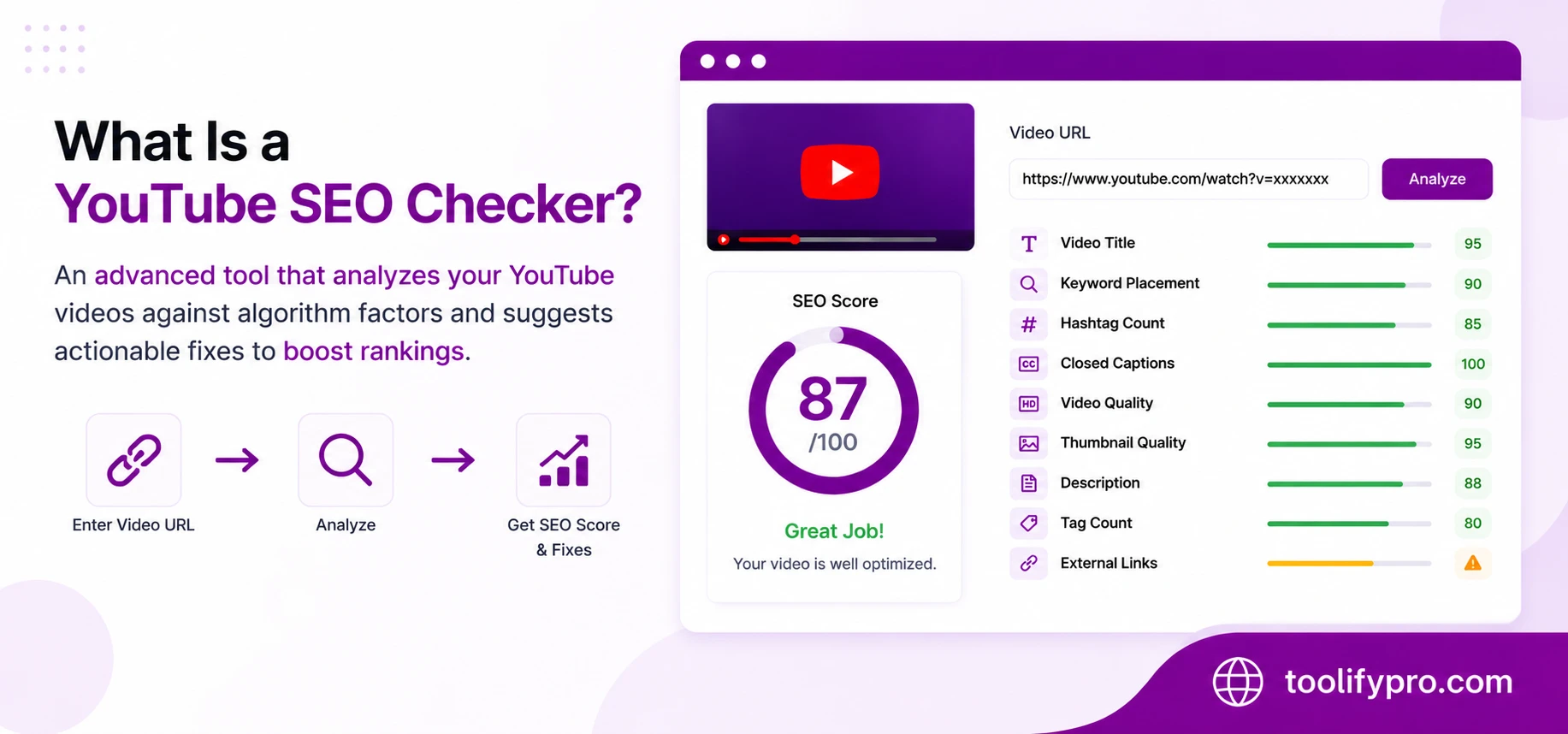
What factors does the YouTube SEO checker analyze?
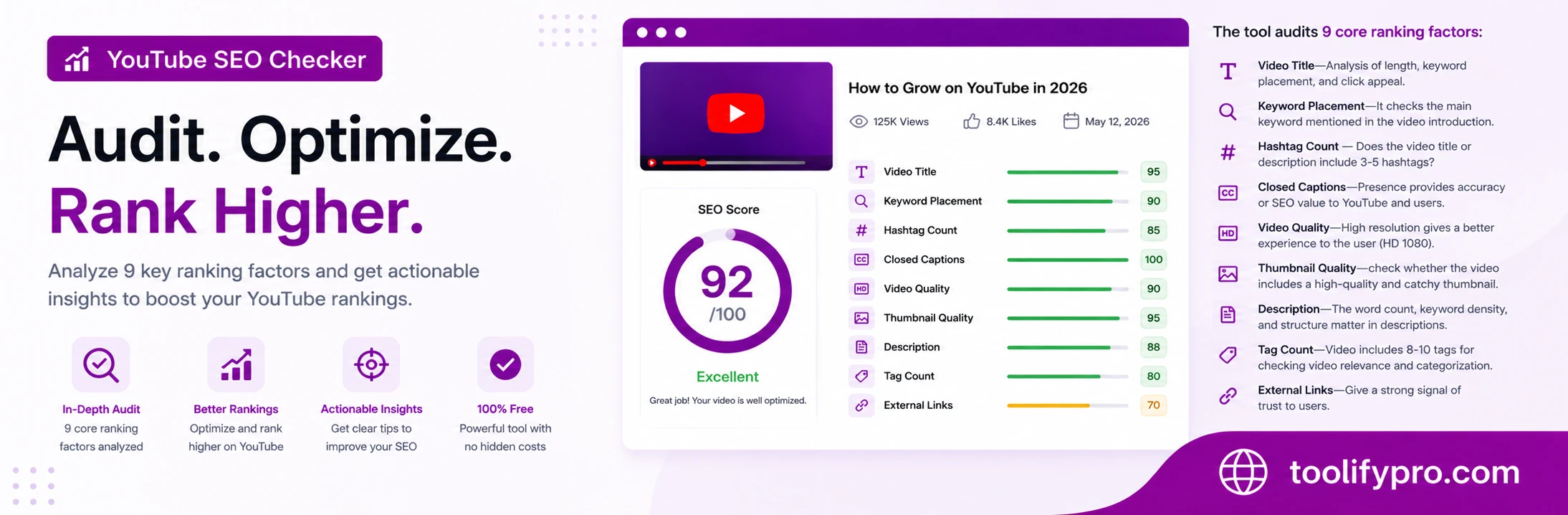
The tool audits 9 core ranking factors:
- Video Title—Analysis of length, keyword placement, and click appeal.
- Keyword Placement—It checks the main keyword mentioned in the video introduction.
- Hashtag Count — Does the video title or description include 3-5 hashtags?
- Closed Captions—Presence provides accuracy or SEO value to YouTube and users.
- Video Quality—High resolution gives a better experience to the user (HD 1080).
- Thumbnail Quality—check whether the video includes a high-quality and catchy thumbnail.
- Description—The word count, keyword density, and structure matter in descriptions.
- Tag Count—Video includes 8-10 tags for checking video relevance and categorization.
- External Links—Give a strong signal of trust to users.
The tool checks the status of each factor and rates them “perfect,” “critical,” or “warning.”
- Perfect—Shows that things are as per SEO guidelines.
- Critical—Necessary factors are missing from videos
- Warning—it shows that the added feature is not as per YouTube guidelines.
Why YouTube SEO Matters
YouTube is the world’s second-largest search engine after the Google search engine and processes over 3 billion searches per month. Those channels follow the best SEO practices consistently and optimize their content. Add the proper 9 core elements, and YouTube will rank those channels at the top, starting to show their content in the following areas:
- YouTube search results
- Suggested video feeds
- Google video carousels
- Google AI Overview results
How to Use the YouTube SEO Checker
- Copy your YouTube video URL
- Paste it into the checker
- Click “Analyze”
- Review your SEO score and per-factor recommendations.
- Apply the suggested fixes and recheck
The full audit takes under 10 seconds.
YouTube SEO Best Practices (What the Checker Evaluates)
Title Optimization
The YouTube video title must include the primary keyword. Titles between 50 and 60 characters attract viewer attention, increasing the click-through rates. YouTube rewards consistent watch time over the misleading titles.
Keyword Placement
Ensure that the primary keyword is included within the first 50-60 characters of the video description to help viewers understand the video’s topic immediately.
Hashtags
Include 3-5 relevant hashtags in the video title and descriptions; they help to categorize the content and appear above the title. Ensure you do not overstuff hashtags.
Closed Captions
Instead of relying on YouTube’s autogenerated captions, upload an accurate SRT caption file that provides a stronger indexing signal to YouTube and connect with a wider audience.
Video Quality
Often viewers prefer high-quality videos with clear visuals and audio. Start uploading 1080p HD videos. It will help to retain maximum viewers.
Thumbnail Quality
Upload a high-quality thumbnail and add clear and relevant text to it. Misleading thumbnails make your click-through rates (CTR) lower.
Description Quality
Write at least 200 words in your description. Add the primary keyword in the first two sentences. For better trust, add video timestamps, social links, and related keywords naturally; do not overstuff keywords.
Tags
Add 5-10 relevant tags that are related to broad and specific terms, and the first tag must be the primary keyword and channel name. Tags help categorize your content and match them to related content, which may help YouTube understand your video’s topic and relevance.
External Links
Include relevant external links in the video description; it will help you to grow your channel and create trust with viewers. Adding social links grows social media reach. If video content is reviewing a product or website, help viewers access it directly.
Who Should Use This Tool?
The various reasons to use the ToolifyPro YouTube SEO tool include creators, marketers, businesses, or agencies; the tool helps them to optimize the YouTube search and get their videos ranked.
- YouTube creators—helps grow organic audiences through better video optimization
- Beginners – helps beginners avoid common YouTube SEO mistakes
- Content marketers – better optimization can improve audience retention and engagement
- Businesses – helps businesses increase brand awareness, trust, and lead generation
- SEO professionals—help audit client channels and videos more efficiently
- Agencies—helps agencies manage and optimize multiple channels at scale

Frequently Asked Questions (FAQ)
Does the YouTube SEO checker work for free?
Yes, the YouTube SEO checker is completely free, and no sign-up is required on YouTube.
Does the ToolifyPro YouTube SEO checker provide accurate reports?
The score result is based on the YouTube ranking factors that are required for best SEO practices, and under the YouTube guidelines, the tool shows how well you optimized the video and have chances for ranking.
How often can I check my channel and video SEO?
If you are a beginner, then you can check each video after uploading and also check when YouTube announces any updates.
Does the YouTube SEO checker rank videos in Google Search as well?
Yes, properly optimized videos may appear in Google search results and can be featured in snippets and AI overviews. Google reads content from the description and title.
Does the Toolifypro YouTube SEO checker analyze competitor videos?
Of course, you can check how your competitor optimized their video to rank in YouTube.
What is a satisfactory YouTube SEO score?
Generally a video score of 80 or above is considered satisfactory; less than 60 is considered low and missing important factors such as description, caption, tags, etc.