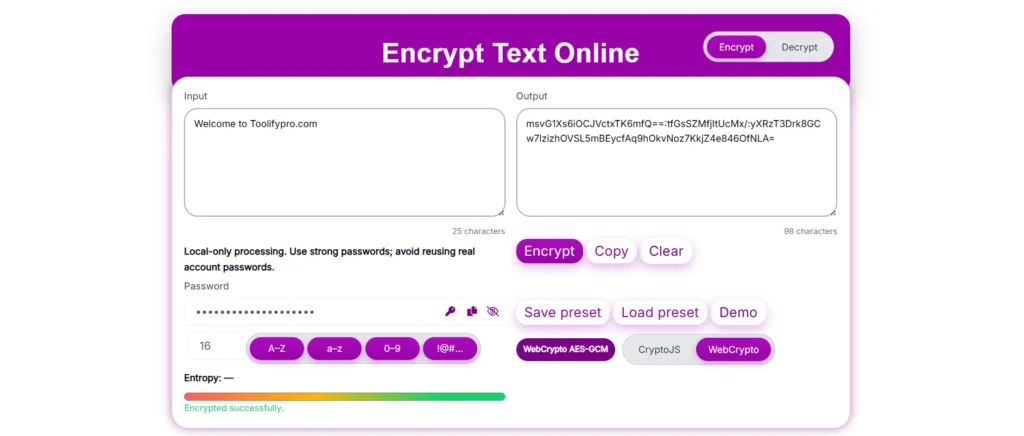
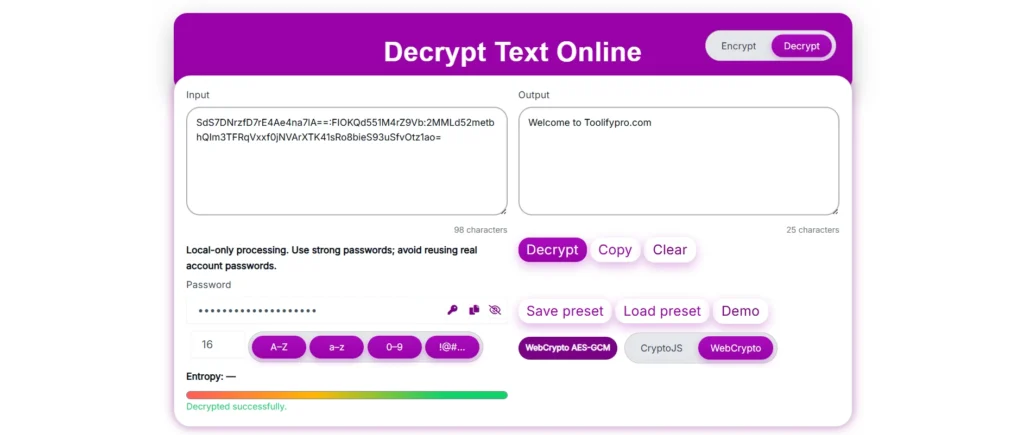
Text Encryption and Decryption: Data privacy and security are top priorities. Encrypting the text before sharing online is the smartest move for sensitive data security. You can use our Text Encryption and Decryption tool to protect your sensitive textual information. The tool uses two strong encryption algorithms, CryptoJS and WebCrypto, and processes all operations locally in the user’s browser to maximize the security.
This tool is helpful for the developers, cybersecurity professionals, or any individual who is privacy conscious, and it is an easy-to-use, clean interface that is safe and fast.
Table of Contents
What Is Text Encryption and Decryption?
Text Encryption
Encryption is a technology that converts the plain readable textual information into the ciphertext, also called the unreadable form, using a unique and strong case-sensitive password; only people who have the correct password can decrypt it into its original form. This process follows two well-known algorithms, CryptoJS and WebCrypto API.
Text Decryption
Decryption follows a reverse pattern that converts the ciphertext, or unreadable form, into readable plain text, but to perform the reverse conversion, it will require the correct password that is used for encrypting the text. CryptoJS and WebCrypto API encryption are irreversible without a password.
Using this Text Encryption and Decryption tool you can do:-
The user can encrypt the text information before sending or sharing it online or with anyone.
You can decrypt the message or textual information using the correct password in this tool.
The tool protects the user’s sensitive data, whether it is a personal message or confidential data.
It has a built-in password generation tool and entropy score checker to measure the password’s strength.
The user can save their encryption text locally as a preset and can load it later to use.
Technology used for text encryption
To enhance the user data privacy and security, we used highly trusted cryptographic libraries CryptoJS and WebCrypto API, which are widely used by web developers. The algorithms these libraries use are unbreakable without providing the correct password.
CryptoJS
CryptoJS is a highly secure encryption and decryption library that is based on JavaScript that can do the operations in the browser. This library uses unbreakable algorithms such as AES (Advanced Encryption Standard), SHA-256 hashing, and more.
Our text encryption and decryption ensure that the CryptoJS encryption process is done within the browser without sending or storing data on the server.
WebCrypto API
The WebCrypto API provides a low-level interface to web browsers that perform cryptographic operations directly in the browser. WebCrypto uses the AES-GCM+PBKDF2 algorithm and provides a secure and standardized function without exposing the raw information, which makes web browsers faster and more secure and system-level cryptography implementations.
Major benefits of using the WebCrypto API
Provides highly secure encryption/decryption
Unbreakable key management
WebCrypto API provides protection against Javascript-based attacks.
Using CryptoJS and WebCrypto together provides a double-layer reliability that enhances the flexibility, speed, and security.
Core Features
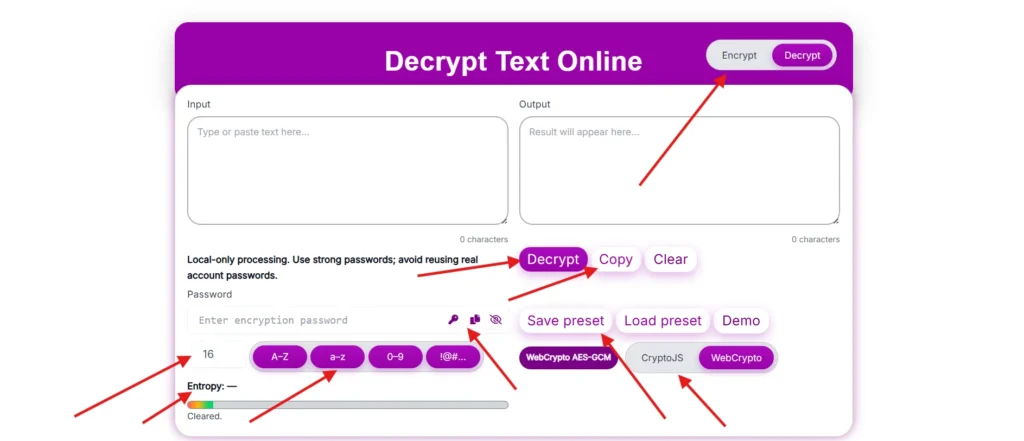
Encrypt & Decrypt Modes: Instead of making two different tools for encrypting or decrypting, it provides an easy way to do both tasks within the same tool by just switching the toggle in the header’s top right corner to either encrypt or decrypt.
Local-Only Processing: To ensure the user data privacy, our tool does all the cryptographic operations locally in the browser, and the tool does not store or process data on the server.
Password Input & Password Generator: The user either enters the custom password or generates the highly secure case-sensitive password, which is a combination of uppercase letters (A–Z), lowercase letters (a–z), numbers (0–9), and special characters (!@#…) using a built-in feature.
Password Entropy Indicator: The built-in Entropy Indicator feature displays password strength in bits, such as Entropy: 103.4 bits. High bits equal a more secure and unpredictable password. example:-
60–80 bits: Security level is moderate
100+ bits: if a password is 100+ bits, it is strong and provides resistance from attacks.
Algorithm Selection: –User has a free hand to choose encryption engines, whether it is WebCrypto AES-GCM or CryptoJS.
Presets Management (Save & Load)—if the user has set some settings for encryption, he can save and load the preset, which helps to avoid repeated configurations.
Demo Mode: For beginners and testers, the tool has a demo feature for testing encryption or decryption without real data.
How to use
Select Mode: From the top right corner, select the toggle to Encrypt or Decrypt.
Enter Text: Type the textual information or paste it.
Set Password: Enter the custom password or generate a strong password using the key icon.
Check Entropy: Check that the entropy bar is “Greener” and 100+ bits to prevent attacks.
Select engine: Choose the CryptoJS or WebCrypto.
Encrypt or decrypt: click on the encrypt or decrypt button.
View Output: The encrypted or decrypted result will appear in the right-hand output panel.
Copy or Save Preset: Copy the encrypted or decrypted text, and if you want to use the same setting in the future, save the preset.
This tool does everything in real time—no delay, no server call, and no risk of data leaks.
Real-life use case
Scenario: Suppose you have a project with confidential detail that you want to share with your boss only and want to hide from everyone, even for future expectations. Here you can encrypt the text by following the below steps.
Steps:
Just open the Text Encryption and Decryption in encrypt mode.
Enter the details in the input box.
Enter a custom password or generate one using the built-in function.
Now click on the encrypt button; it will convert your plain text into an unreadable cyphertext format.
Copy the ciphertext from the output and share it with your boss, and ensure the password is shared separately.
Now, ask your boss to open the same tool, switch to decrypt mode, enter the ciphertext (the unreadable text) in the input field, input the password, and click on decrypt; this will reveal the original message.
These steps build end-to-end encryption between you and your boss.
Why You Should Use this Tool
Privacy First: This tool provides 100% encryption in web browsers.
Easy to Use: Our tool has an intuitive and simple design anyone can use without training.
Cross-Platform: This is a browser-based tool that can be operated from a laptop, mobile, PC, or tablet.
Advanced Crypto Standards: The tool provides two types of encryption algorithms.
Password Strength Visualization: We added a real-time entropy score checker to check the password strength.
User-Friendly UI: While developing this, we focused on providing an easy user interface. and clean.
Frequently Asked Questions (FAQ)
1. Does my data store and transmit over the internet? NO, all operations are done locally in your browser; we do not store your data.
2. What is entropy and its uses? It is a function that measures the password strength and checks whether it is unpredictable or not and shows the result in bits above; if it is 100+ bits, then it is unpredictable.
3. Can I encrypt the files also? Currently this tool supports text encryption only, but don’t worry, you can use another one of our file encryption tools.
4. What if forgot the encrypted password? Due to security issues, once text is encrypted, it cannot be recovered back in its original form without a password.
5. Can the tool work offline? You will be required to load this tool; once loaded, you can do multiple encryptions without internet.