
🔐 Email Encryption Tool
Encrypt Instantly, Stay Private: Protect your email subject & body with AES-GCM or RSA-OAEP — 100% in your browser, never stored, never shared.
✍️ Compose
UTF‑8 → AES‑GCM
Zero servers
Copy / Download / MailAdvanced: Use RSA‑OAEP keypair (hybrid). Generate keys; encrypt with Public Key, decrypt with Private Key.
RSA mode uses a random AES‑GCM key to encrypt content, then wraps it with RSA‑OAEP (SHA‑256). Output is also a Base64 JSON package.
Related Tools
About : Email Encryption Tool
Email encryption tool designed to protect the email subject line and email body using the advanced AES-GCM or RSA-OAEP encryption algorithm, and it is a 100% web browser-based tool that performs all the operations locally; user data is not stored or shared over the internet.
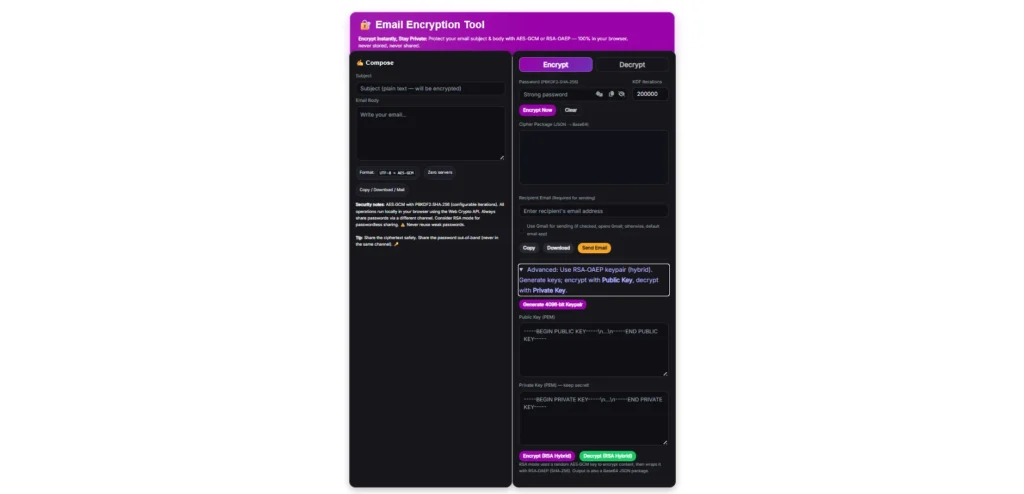
Table of Contents
What Is the Email Encryption Tool?
The Email Encryption Tool is a web-based online utility that converts your email subject and email body into an unreadable encrypted format and decrypts to the original format. It uses advanced cryptographic algorithms AES-GCM (Advanced Encryption Standard – Galois/Counter Mode) and RSA-OAEP (Rivest–Shamir–Adleman – Optimal Asymmetric Encryption Padding).
This tool completely works on the client side. That means your data is not stored or shared anywhere, whereas traditional methods require the server side, which stores the user data.
Core Features of Email Encryption Tool
- End-to-End Encryption: The email content you have entered is encrypted using AES-GCM & RSA-OAEP. Once the user leaves the browser, the information is automatically wiped, and plain text information is never transmitted or stored remotely.
- AES-GCM & RSA-OAEP Options: The tool has two advanced encryption algorithms; for password-based encryption, AES-GCM, and for more advanced encryption, the tool has RSA-OAEP, which works on public and private key operations.
- AES-GCM with PBKDF2-SHA-256: The tool has features that enhance the security and protect from brute-force attacks; users can configure key deviation iterations. The default set is “200,000,” which makes passwords robust and non-reusable.
- Two-In-One (Encryption/Decryption): A single tool has encryption and decryption features. If the recipient wants to decrypt the email that the user has sent, they can decrypt it by entering encrypted text and a password or a public and private key.
- Password Generator: Users have the flexibility to enter the custom password, or they can generate a highly secure case-sensitive password using the in-built password generator.
- Secure Format Handling: While composing the email subject and body, it also includes the encryption process UTF-8 to AES-GCM, and it is compatible with the JSON and Base64 encodings, which added another security layer for data handling.
- Zero Server Storage: User data with this tool is 100% safe; all operations on the user data are performed in their own browser and local system, and it is completely client-side with no third-party interference.
- Flexible Email Delivery: For the user’s convenience, the tool has the client-side auto email composing feature by using integrated Gmail and the default email app. The tool only passes the ciphertext package, or unreadable text, to preserve the privacy.
- Copy/Download/Mail: Once the user data is encrypted, they can easily copy, download, or send directly by email.
- Advanced Hybrid Mode: The most advanced feature that the tool has is RSA-OAEP hybrid encryption, which generates key pairings for encrypting the public email, and for decrypting, the recipient has to use private keys. This feature is ideal for repeated conversion and enterprises.
- No Account Needed: Generally these types of tools are paid and require sign-up, but this tool does not require any registration or setup to encrypt email.
How to encrypt and Decrypt email
Email Encryption Tool is designed to make email encryption effortless; no matter whether users are beginners or experienced, anyone can use it.
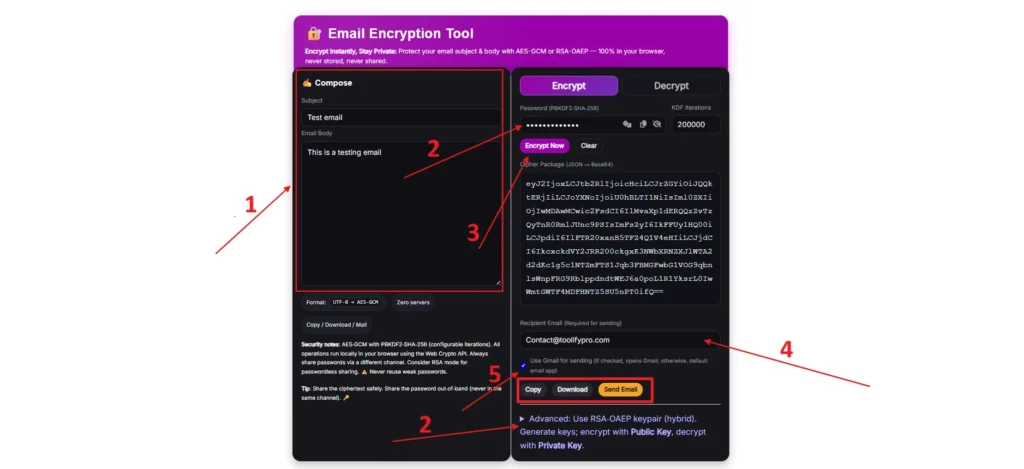
Encrypt and send email:
- Open the email encryption tool.
- Enter the email subject and body content in the left-side compose section.
- Choose encryption mode, whether using a password or the advanced hybrid keypair option.
- Password: Enter the custom password or generate a secure password by clicking “two dice icons” in the password section and click the “Encrypt now” button to encrypt the email
- Advance Hybrid (Key-Pair): Clicking on “Generate 4096‑bit Keypair” will generate a public and private key, and now click on “Encrypt (RSA Hybrid)” to encrypt email using the key pair.
- Enter the recipient email.
- The user can send email via Gmail and the default email app; for Gmail users, checking the checkbox is required.
- If you want to send email manually, copy or download the cyphertext and carefully store the password and keypair separately to protect from theft.
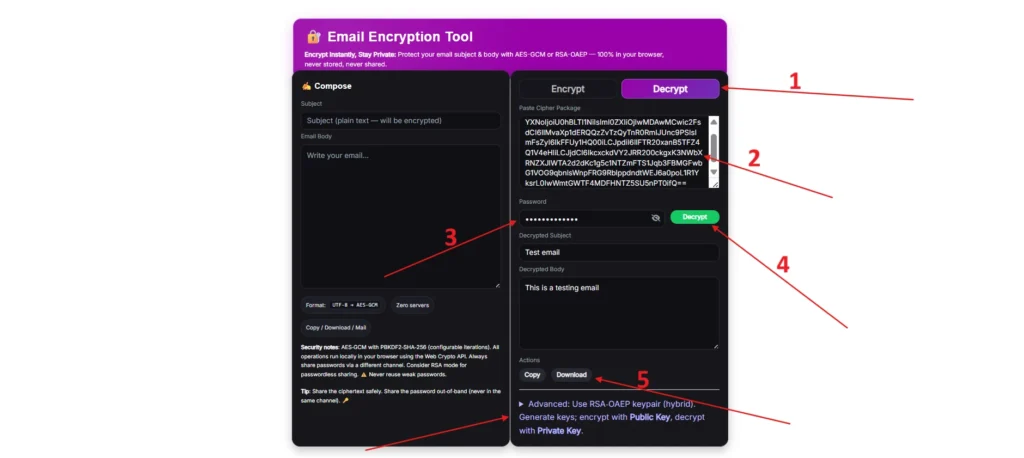
Decrypt the email:
- Choose the Decrypt mode.
- Enter the cyphertext in the right-side “Paste Cipher Package.”
- Enter the password, or if encrypted using a key pair, paste the public and private keys.
- Now click on the Decrypt button for the password, and for the key pair, click on “Decrypt (RSA Hybrid).”
- Done.
Security Tips
- After the encryption, send the password or private key separately through a secure channel.
- Use a case-sensitive password that includes capital and lowercase letters, special symbols, and numbers, and avoid reusing passwords or generate one using the inbuilt password generator.
- Increase the PBKDF2 iterations to increase the protection against brute force attacks.
- For business email, use RSA mode, which has public and private keys.
Why Choose This Tool?
While other encryption websites use the external servers or API, this email encryption tool is completely client-side; all operations are done within the user’s browser. It never transmits, stores, or records log information and works with full transparency. As soon as the user refreshes or leaves the website, the data is automatically cleaned.
While other tools retain the following data:
- User data in plain text
- Password and RSA public and private keys
- Might analyze user data for personal interest.
Frequently Asked Questions (FAQ)
Q: Is this encryption free for personal and commercial use?
A: Yes, Tool is completely free for everyone, no matter if it’s for personal or commercial use.
Q: Do I need to register?
A: No. You can use it without registration.
Q: Is it useful for businesses?
A: Yes, Tool helps to safeguard the company’s confidential information from phishing or data breaches.
Q: Do I need to download software?
A: No, it completely runs in the web browser.
Q: Does my data store or process on servers?
A: NO, we do not store or process user data, passwords, or keys.