
Base64 Encoder
Related Tools
Intro – Base64 Encoder and Decoder
Data security is one of the major concerns in today’s world when you are handling the company’s, personal, or professional data; working with APIs; a cybersecurity student experimenting; or working with other types of data. Base64 encoding and decoding tools play a crucial role when protecting or transmitting data; these tools help developers, designers, or users who handle sensitive data.
Our Base64 Encoder and Decoder Tool is a powerful web-based tool that allows you to protect, encode, or decode text information instantly. This is a fast, accurate, and reliable tool.
The program converts the plain text into a base64 format and can reverse back to the original format using the decode function of this tool. The Base64 format is safe for sharing text data online without risk.
Table of Contents
What Is Base64 and Why It Matters
Base64 is an engineering technique that converts binary and complex data like images, files, and scripts into readable text characters. Using this method, data can be transmitted safely in textual form from one system that does not support other information like URLs, APIs, and HTML forms and reversed back into the original format without any loss or data corruption.
For example, if you want to send an image, password, or encrypted text, the base64 technique ensures that data is transferred safely.
Base64 Encoder—in simple words, it changes the plain information into a Base64 string for safe sharing.
Base64 Decoder—It restores or reverses the original content from the base64 string and makes data reusable again.
Our tool is fully efficient at doing both encoding the information and decoding the information.
How Base64 Encoder Works
- Base64 Encoder takes input from the user as a file or text.
- convert into binary information in 0s and 1s
- Split each into 6 groups
- Map a 6-bit group to a base64 characters.
Backend process:-
Input: Taking input as “Man”
Man
Step 1: Converting text into Binary 0s and 1s
M = 01001101
a = 01100001
n = 01101110
Step 2: Combining and grouping 6 bit chunks
010011 010110 000101 101110
Step 3: This step convert 6-bit groups to Base64 characters
010011 → T
010110 → W
000101 → F
101110 → u
Output (Base64 encoded):
TWFuHow Base64 Decoder Works
This is a reverse process to get data into the original format.
Backend process: –
Encoded text:
TWFu
Step 1: Converting each Base64 character or string to 6-bit binary
T = 010011
W = 010110
F = 000101
u = 101110
Step 2: Combining all bits.
010011010110000101101110
Step 3: Splitting into 8-bit bytes
01001101 01100001 01101110
Step 4: Convert each byte to a character
01001101 → M
01100001 → a
01101110 → n
Decoded Output:(Original Format)
ManHow our Base64 Encoder & Decoder tool works
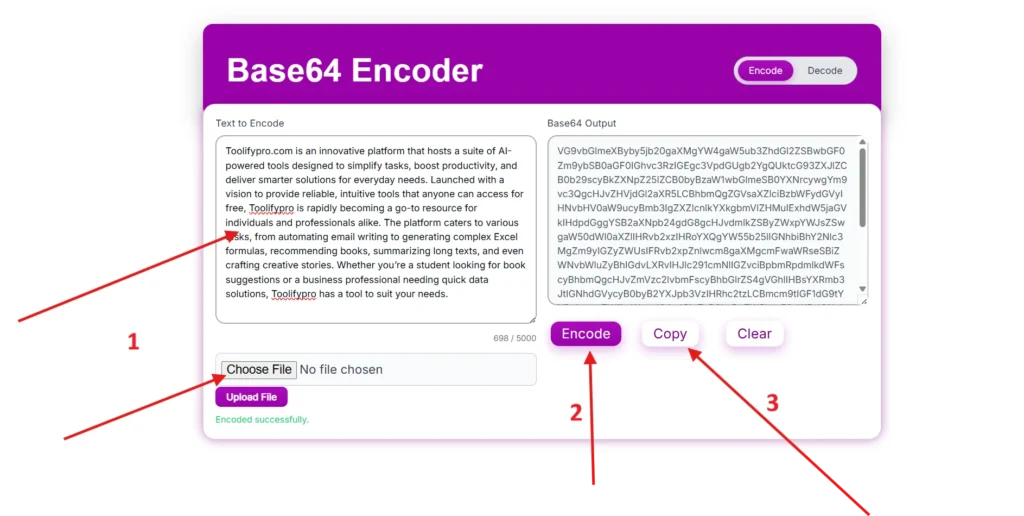
Encoding:-
Step 1. Paste or upload the the text file.
Step 2. Click on the Encode button.
Step 3. Encoding done copy.
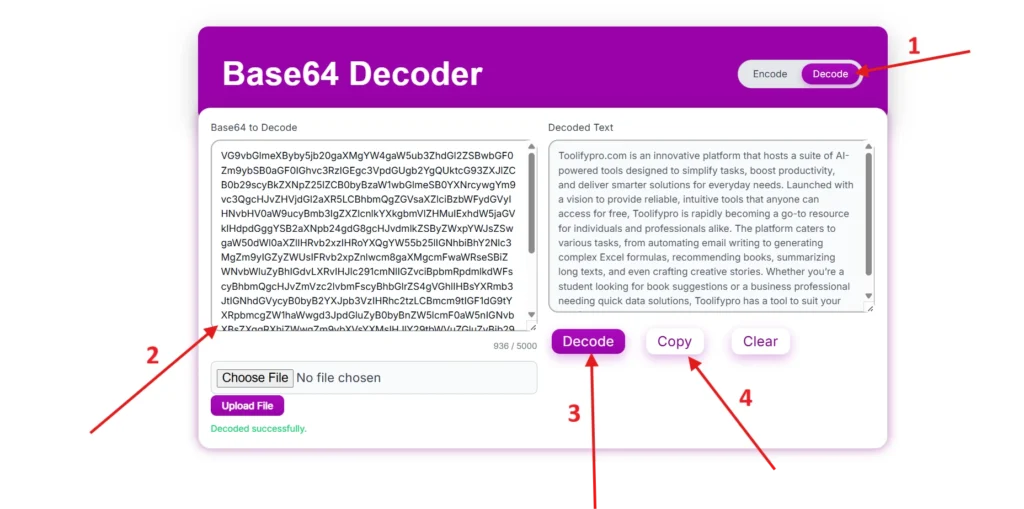
Decoding:-
Step 1. Switch the toggle in the header encode to decode.
Step 2. Paste the encoded text or upload text file.
Step 3. Click on the decode button.
Step 4. Get the original data.
Key Features
- Instant Encoding and Decoding—Our tool works on a real-time basis to encode and decode data within a few seconds.
- Client-Side Processing—The tool does not store user data to ensure the user’s privacy and safety.
- One-Click Copy—The user can get the encoded or decoded data in one click.
- Free and Unlimited Access—The tool doesn’t have any limitations; a user can use as much as he wants with sign-up.
- Mobile-Responsive Interface—Our tool is browser-based; users can use it on any device, whether it’s a desktop PC, tablet, Mac, or mobile.
Developer-Friendly—Engineers and developers can use the tool in their regular work to ensure the security. - Distraction-Free Experience—The tool has a clean, simple, and completely focused interface.
Data Privacy
Our Base64 Encoder and Decoder Tool performs all operations locally in the browser to ensure the user data sensitivity. No information is saved or sent to an external source or API, or the cloud; this ensures that your information is confidential and secure on toolifypro.com. “Your data will stay in your devices only”.
Frequently Asked Questions (FAQ)
Q – Is this tool useful for developers and programmers?
Yes, both can use the tool to transmit data safely.
Q – Do I need to buy a subscription or sign up?
The tool is 100% free; no use limitation or sign-up is required.
Q- How much time will the tool take to convert
The tool works on a real-time basis and takes few seconds only.
Q- Does the Base64 encoder encrypt data?
No, the Base64 method just converts plain information into Base64 format, which is reversible without any key.
Q – Does the tool support file uploads?
No. Currently the tool accepts text information only.