
File Encryption
Related Tools
Today’s digital shift marks a new era, where data privacy and file security are essential for everyone—whether they are students, working professionals, business owners, or individuals who value their personal information. To understand this, we developed a Advanced File Encryption and Decryption Tool. It is an online data security utilities tool that encrypts your file using a password and decrypts it by proving the same correct password.
This tool greatly ensures that files remain protected and inaccessible to anyone if they do not have the password. The tool supports various file types, whether they are documents, images, videos, or your business’s confidential files. Our tool encrypts these files. Moreover, the tool does not store your file; as soon as you leave the website or refresh it, the file is automatically deleted. All operations are done in your local system.
Table of Contents
What Is File Encryption?
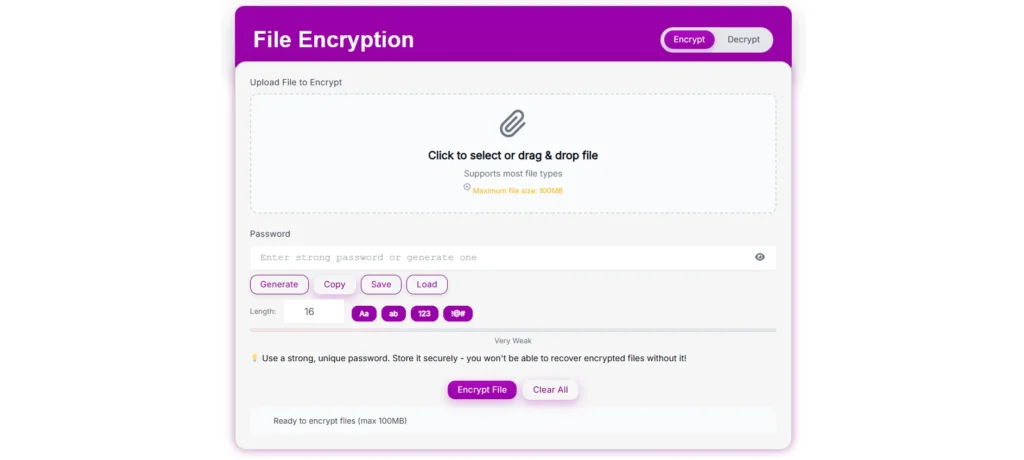
File encryption is a process that converts a readable file into an encrypted code format, also called ciphertext, using a high-security password or encryption key. Once the file has been encrypted, it will become inaccessible and unreadable; it requires a password or encryption key to access it.
This is the most effective way to protect digital information from unauthorized access, data breaches, or data theft. Even if someone gets your file for their own personal interest, they still won’t be able to access, read, or modify it without proving the encryption key or password. Our tool works completely online, which makes it quick and easy to encrypt the file without downloading additional software. It can also be decrypted using our tool.
What Is File Decryption?
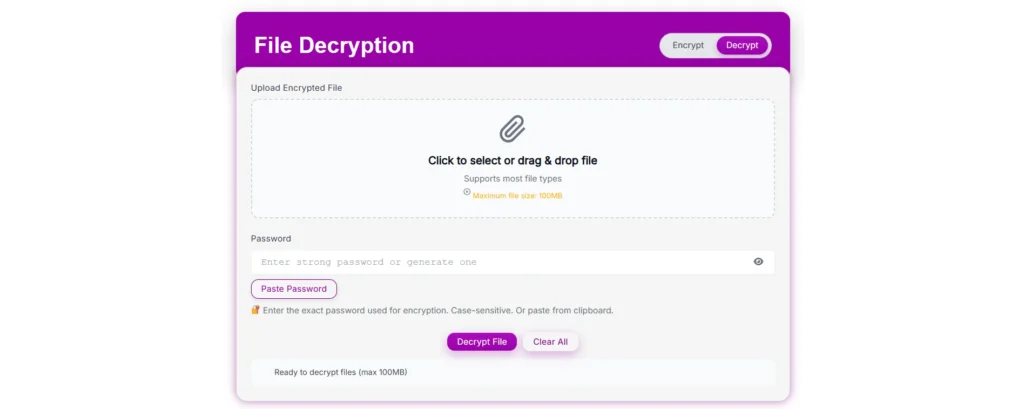
File decryption is the reverse process of encrypting the file; it takes back the original file format of the file by providing the correct encryption key or password. Our tool is highly secure; it will not decrypt the file if someone is trying to force a dictionary attack, malware, or any unethical activity. The file is inaccessible unless the user provides the correct encryption key or password.
How to Use the Advanced File Encryption and Decryption Tool
Our Advanced File Encryption and Decryption Tool is simple and user-friendly; there’s no need to become a tech expert to use our tool. Even a beginner can use it. Let’s follow the below steps:
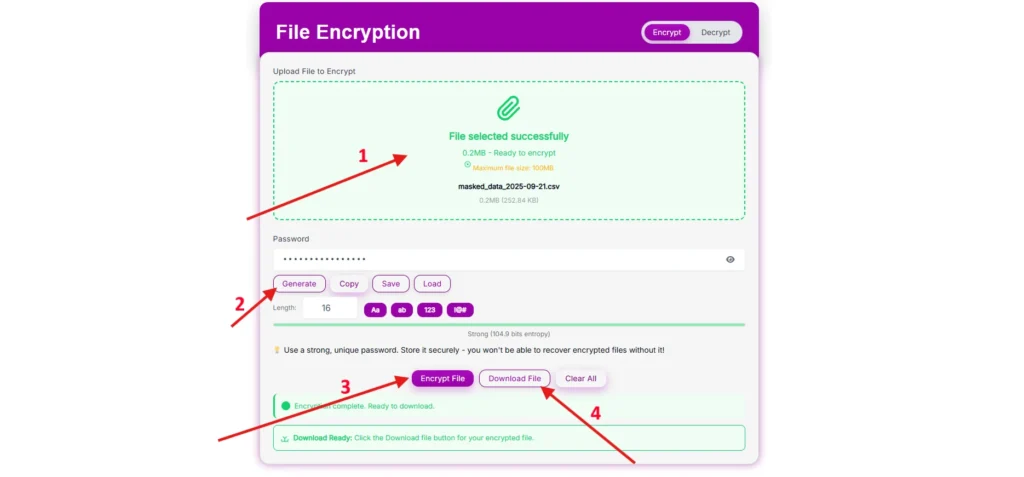
File Encryption:-
- Upload file—Simply select the file that you want to encrypt, whether it is an image, document, video, or business file.
- Enter password or generate—Enter the case-sensitive password, or you can generate using the inbuilt password-generating feature.
- Encrypt and download—simply click on the Encrypt file button; once done, download it.
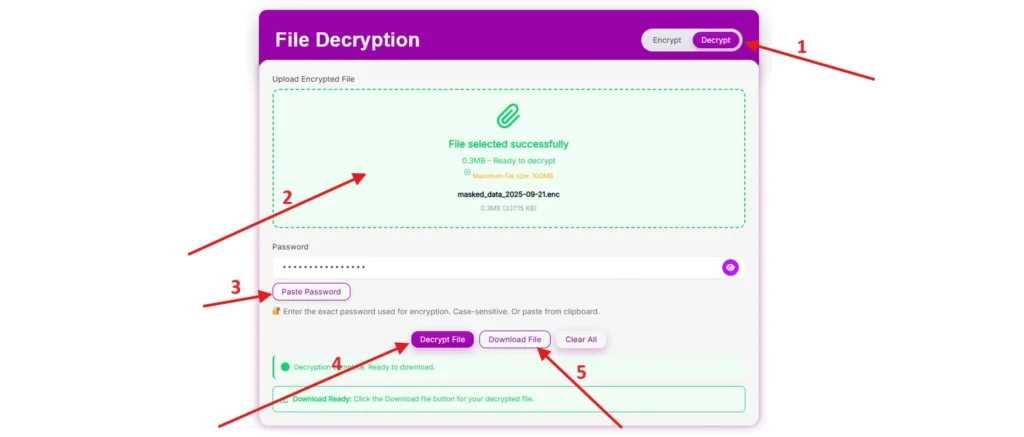
File Decryption:-
- Switch Toggle—Click on the toggle in the header to switch the file encryption tool to File Decryption.
- Upload file—click or drag the encrypted file.
- Enter password—use the password that is used for encrypting the file to decrypt it.
- Decrypt and download—Click on the decrypt fill button, and the file will return to its original format.
Why Use File Encryption?
Data protection has become more important after rising cyber threats, unauthorized access, and online vulnerabilities. Here are the reasons why you should use the File Encryption and Decryption Tool:
- Privacy Protection – This tool makes your file inaccessible from unauthorized use and makes your data file more secure.
- Secure File Sharing—Encrypted files are more secure; users can share the files without worrying about unauthorized access. To make it more secure, share the password separately.
- Prevent Data Theft—If files or devices get stolen, encrypted files are still inaccessible.
- Business Security—Whether sharing an agreement, contract, report, or other sensitive data, the business is protected.
- Simple Yet Powerful—this tool does not require tech skills, coding, or experience to use it.
Key Features of the Tool
- Inbuilt Password Generator—It has a feature that generates high-security, case-sensitive, customizable passwords.
- Password-Based Encryption—Protect a file by entering a password or using a generated password.
- Easy to Use—Simple interface to upload files.
- Multi-Format Support—It supports multiple file formats, whether they are images, documents, software, videos, or other.
- Fast Processing—takes only a few seconds to encrypt the file, based on file size.
- No Installation Required—The tool is 100% online; you do not need to download an app or software to use it.
- Privacy-Focused – The tool works in the local system and does not store or collect your data.
- Cross-Platform—Our tool is platform independent; you can use it on any device, whether mobile, PC, or MacBook, using any browser.
- Lightweight Interface—it’s simple and user-friendly. interface makes it easy and lightweight
Real-Life Use Cases
Let’s take some real-life scenarios where this tool can be used.
- Professionals—There are a lot of files in professional life, whether they are business reports, contract agreements, or proposals, that need to be protected from unauthorized access; here this tool is needed.
- Students—Students make their project and research assignment unique to protect from copying his work; they can use our tool to encrypt the file before sharing.
- Photographers & Creators – Creators and photographers give their full efforts for their work, but sharing online without encryption might result in someone stealing their work.
- Companies—For companies some confidential files are shared among team members that are encrypted.
- Everyday Users – The personal file, diaries, or documents are encrypted to make sure the personal privacy of users is protected.
Frequently Asked Questions (FAQ)
1. What if I forget the password?
The file will be inaccessible if the user loses the password. Due to security reasons, we do not store passwords; always keep the password safe with you at the time of encryption.
2. Is there any size limit?
Most browsers don’t handle big file sizes; the size limit and recommended size is 100 MB.
3. Is it safe to encrypt online?
Yes, an encrypted file is inaccessible until the user has the correct password. Make sure while sharing a file to share the password separately to prevent unauthorized use.
4. Can I change the encrypted file password?
No, you can’t directly change the password; you can first decrypt the file using the password and re-encrypt it with a new password.
5. Is this tool free?
Yes, Tool is completely free for everyone.
6. Difference between file encryption and ZIP files?
Zip is a file compression method where password protection is not mandatory or it can be broken, whereas encryption is a stronger cryptographic security.
7.Is it legal to use encryption tools?
Yes, it is legal to use for protecting data from unauthorized access, not for hiding illegal or copyrighted content. The user is responsible for encrypting the file using this tool.