
Hash Generator & Verifier
About- Hash Generator and Verifier
Data integrity, or its security, is an important thing; the hash generator can help whether you are a developer, data scientist, cybersecurity professional, or regular internet user. This hash generator and verifier is designed to generate a unique hash value from user input, such as a message or password, and instantly verify it.
This tool ensures that user passwords or messages are converted into unique hash values using multiple cryptographic algorithms, and it is an important tool for developers who are working on developing authentication systems, API security, data verification, or password protection mechanisms.
Table of Contents
What Is a Hash Generator?
The Hash Generator is a web-based tool that converts user input into a hash value using cryptographic algorithms such as MD5 (for backward compatibility), SHA-1 (legacy), SHA-256/SHA-512 (modern security), SHA-3, and others.
Hashing is a one-way process that means once user input is converted into a hash value, it cannot be reversed. This feature of hash values makes them the perfect tool to store passwords, file verifications, and data integrity.
Hash Value Meaning - A hash value is a unique fixed-length string of characters that is generated from user inputs such as passwords, keys, and files.
Example: User has enter input as" Hello" and tool generated hash value as in screenshot
Input : "hello"
Hash_Value: "2cf24dba5fb0a30e26e83b2ac5b9e29e1b161e5c1fa7425e73043362938b9824"
Algorithm: "SHA-256"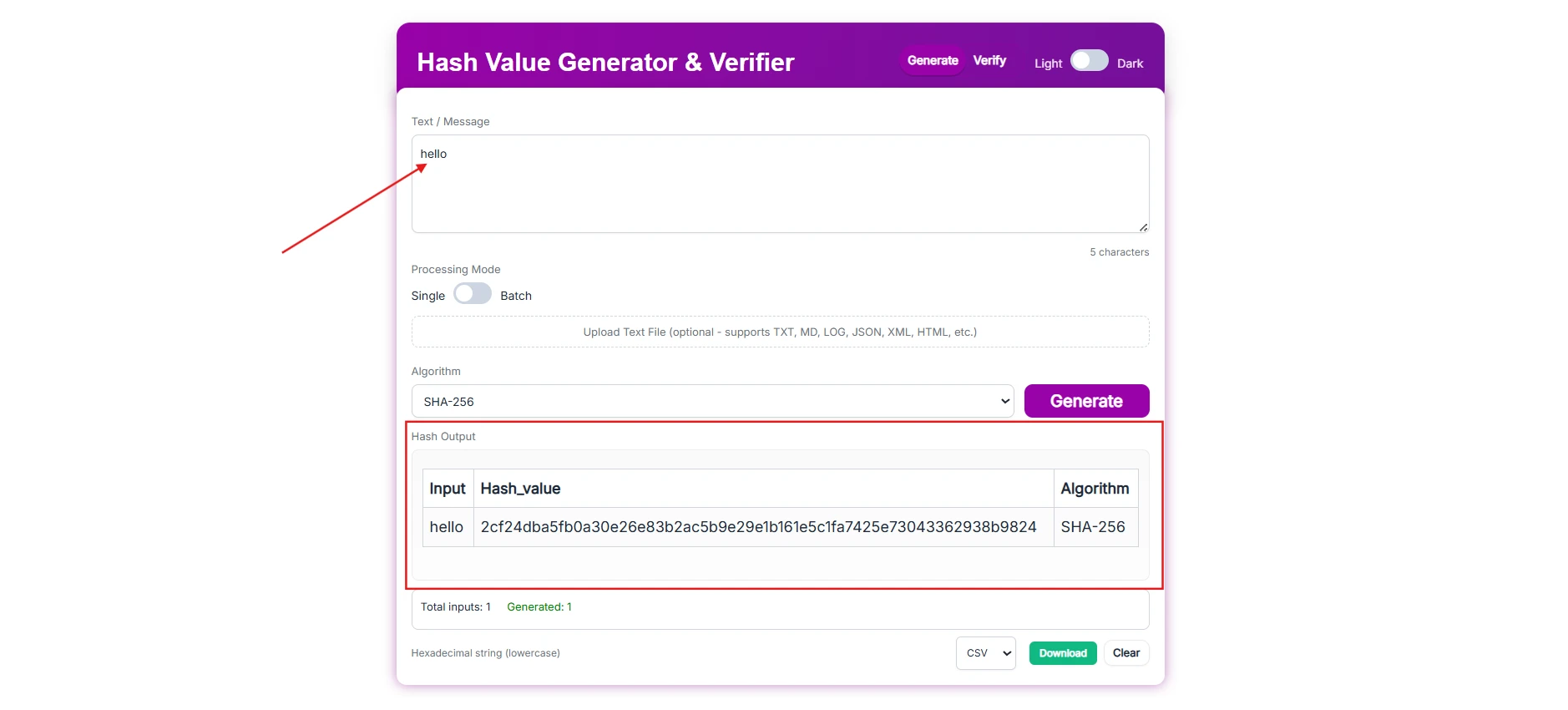
What Is a Hash Verifier?
Hash verifier is a tool that matches the user input and corresponding hash value, whether it is MD5 (for backward compatibility), SHA-1 (legacy), SHA-256 / SHA-512 (modern security), SHA-3, or others.
Hash verifiers help developers, cybersecurity professionals, and data analysts to verify that user input matches with the hash value and let them know which hash algorithm is used.
Hash value check: The user has to enter the input and hash value, and after clicking on verify, the result is shown as in the screenshot.
Input : "hello"
Hash to verify: "2cf24dba5fb0a30e26e83b2ac5b9e29e1b161e5c1fa7425e73043362938b9824"
Verification result : "Match-Hash matches using SHA-256"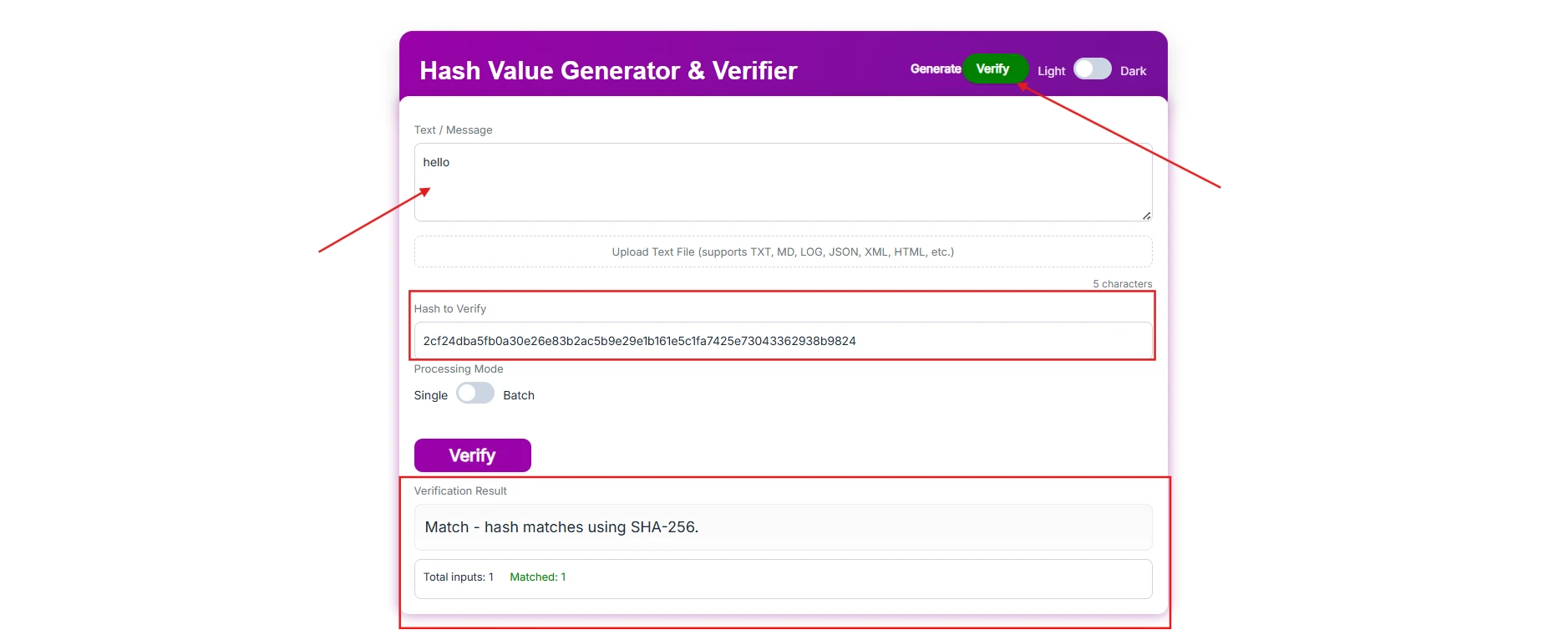
Core Features
This Hash Generator and Verifier Tool has multiple features that make it stand out from the others.
- Dual Functionality—Users can generate and verify the hash value with in single tool. Just switch the toggle to generate or verify in the top right corner of the header.
- Light/Dark Mode—Users can switch from light to dark theme mode for a better experience.
- Character counter—This feature allows the user to measure the character limit.
- Batch Hash Generation—The batch feature generates 1000s of input hash values in one go by uploading a CSV or Excel file.
- Batch Verifier—The tool has a feature that verifies 1000s of hash values in one go by just uploading a CSV or Excel file.
- Algorithm selector—The user has access to generate the hash value in multiple algorithms.
- MD5 hash generator—This hash value generation feature is ideal for checksum validation.
- SHA-1 hash generator—hash values generated using this algorithm for basic validation
- Hash value generator SHA256—it generates a modern, highly secure cryptographic hash for encryption.
- SHA-512 hash generator—This is also a cryptographic algorithm, also called a digest, that generates highly secure hash values.
- Status - The tool gives a count of hash values generated and a count of hash values matched.
- Download—The users can download the processed file in CSV, Excel, and text format.
Security and Privacy
We designed a password hash generator online to keep the user data privacy and security in mind. This tool doesn't store user data; everything is done locally in the user's browser with cryptography libraries (like CryptoJS or WebCrypto API).
How does batch processing mode work?
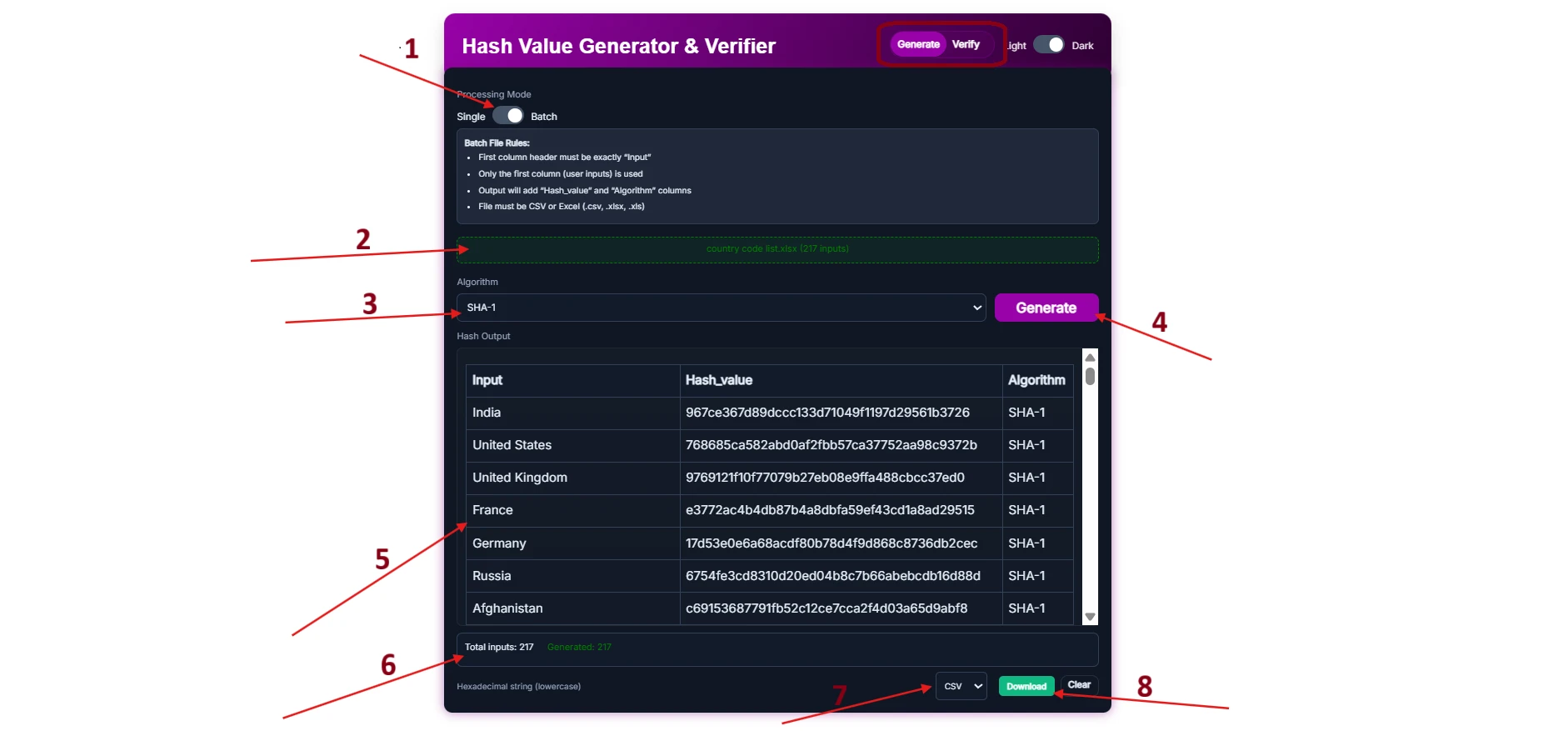
- Batch hash generate:
- Switch processing mode toggle from single to batch
- Upload an Excel or CSV file—the first column must have the header "Input."
- Select Algorithm—MD5, SHA-1, SHA-256, or SHA-512
- Click on the "Generate" Button
- The result will appear below with the hash value and algorithm.
- Total input and generate hash value count
- Download file type select CSV, Excel or text.
- Click on Download
- Batch hash verify:
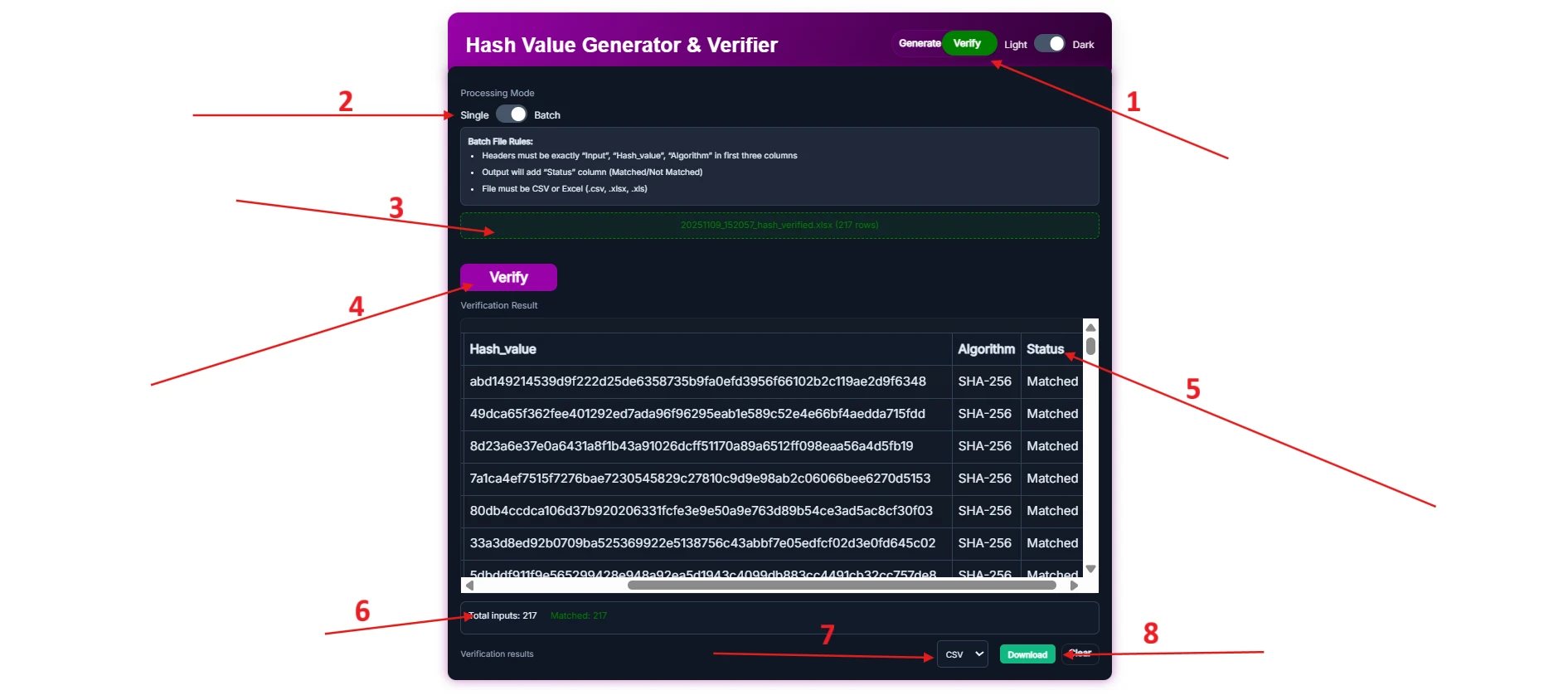
- Switch the tool "generate" to "verify" from the top right corner.
- Select the processing mode batch
- Upload file—Must be CSV or Excel with the first three columns having headers "Input," "hash_value," and "Algorithm."
- Click on the "verify" button.
- Results will appear show status
- Matched hash value count
- Download file type CSV, Excel, or text format.
- Download the result
Frequently Asked Questions (FAQs)
What is the hash value meaning?
A hash value is a fixed-length string that converts a user message or password into a hash value, and it is also called a digital fingerprint.
Is it a hash reversable?
No. Once the original data is converted into a hash value, it cannot be reversed.
What is an MD5 hash generator?
The MD5 hash value generator is used for validating checksums and older systems.
Which is better, MD5 or SHA-256?
SHA-256 is the latest and strongest hash algorithm, whereas MD5 is a checksum for file validation.
Is user data stored or processed on the server?
No, all the operations are done locally in the user's browser. As soon as the user leaves the website, the data is auto-cleaned.
Can the tool verify the hash values?
Absolutely, you can switch to verify the input value and hash value, and also you can verify 1000s of hash values in one go.
Is hashing case-sensitive?
Yes, hashing is case sensitive; if the user types "HELLO" or "hello" using upper or lower case, the hash value will be totally different.
"HELLO" - 3733cd977ff8eb18b987357e22ced99f46097f31ecb239e878ae63760e83e4d5
"hello" - 2cf24dba5fb0a30e26e83b2ac5b9e29e1b161e5c1fa7425e73043362938b9824
Do the Hash Generator and Verifier Tool work on mobile?
Yes, this tool is designed to work on mobile, laptop, or tablet.
Does this tool support SHA-512 hashing?
Yes, this tool has support for SHA-512 hashing.
Is this tool free?
Absolutely, this tool is completely free.